The maths behind a raycaster: Trigonometry
Breaking down what it takes to render a single frame of a Wolfenstein-style 3D engine
Wolfenstein 3D came out in 1992 and ran on hardware that wasn't meant for 3D rendering. The trick was raycasting: you don't actually render a 3D world, you render a 2D grid and fake the third dimension. My teammate and I built such a raycaster in C. In this post I will break down the maths needed to render one single frame - coding this and then seeing how the computer runs it at 30fps or more opened my eyes for the computational power of a computer.
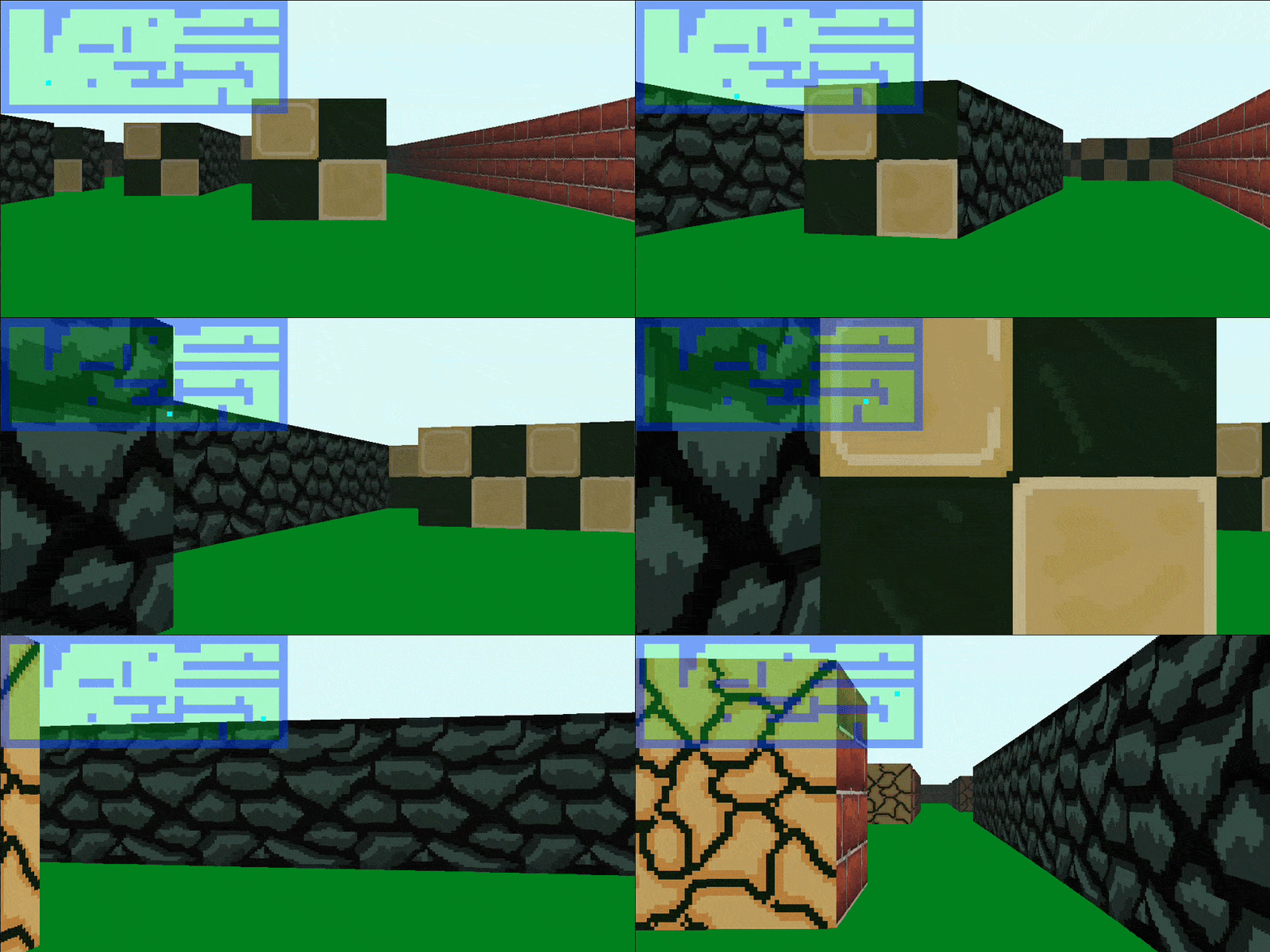
The setup
The world is a 2D grid where every cell is either empty or a wall. We chose blocks to be 64 x 64 pixels. The player has a position in pixels (not blocks) and a viewing direction as an angle.
Two conventions are important for everything that follows:
- y grows downwards - like in any image buffer
- angles grow counter-clockwise -
0°is east,90°is north
This means a ray pointing 'up' on the map (angles between 0° and 180°) has a decreasing y. If you ever wonder about a sign flip in the code, this is the reason.
The projection plane
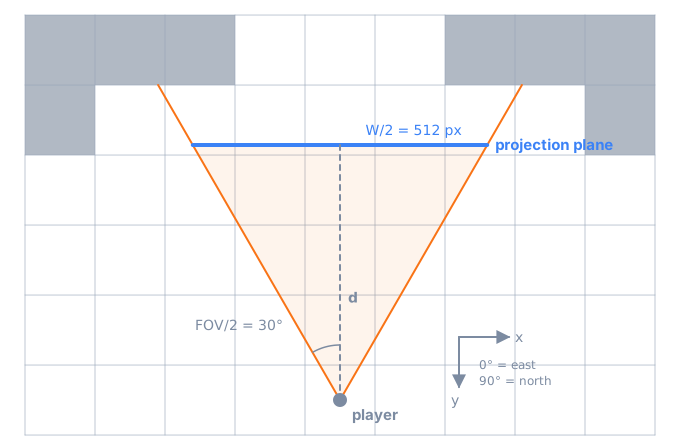
The screen is modelled as a flat plane in front of the player. Its width is the window width (e.g. W = 1024) and you need to choose a field of view (here 60°). The only unknown is how far away the plane sits, which falls out of the right triangle above:
tan(FOV/2) = (W/2) / d
d = (W/2) / tan(FOV/2) = 512 / tan(30°) ≈ 886.8 px
Since this stays constant, it can be computed once on startup.
One frame
A frame is drawn column by column. For each of the 1024 columns we cast one ray and answer the same questions:
- In which direction does the ray go?
- Where does it hit a wall?
- How far away is that wall really?
- How tall should it appear on screen?
- Which texture and which part of it do we draw?
- How dark should it be?
That means solving 1024 small trigonometry problems for just one frame.
1. Casting the rays
The first ray starts at the left edge of the field of view, dir + 30°, and every following ray is rotated by FOV / W ≈ 0.059° clockwise:
ray.angle = sum_angle(cub3d->view.dir_angle, (double) FOV / 2);
angle_increment = (double) FOV / WINDOW_WIDTH;
(Spoiler: this constant step is not quite correct, more on that at the end.)
2. Finding the wall
This is the core of the whole engine. The naive approach would be to walk along the ray in tiny steps and check after each step whether we are inside a wall. That's slow and there is an infinite amount of points to check.
But there is one observation that allows for a smarter approach: a ray can only enter a new block when it crosses a grid line. So we only need to check the points where the ray intersects grid lines. This is called DDA (Digital Differential Analyzer). To keep the maths simple, horizontal and vertical grid lines are handled separately.
Horizontal grid lines
Let α be the angle between the ray and the vertical. For a ray pointing up, the first intersection A lies on the grid line right above the player. Its y coordinate is the player's y snapped to the grid, and the x coordinate follows from tan(α):
A.y = floor(pov.y / 64) * 64
A.x = pov.x ± (pov.y - A.y) * tan(α)    // + if the ray points right, - if left
Now comes the nice part. From A on, every next intersection is exactly the same offset away: one block in y and 64 * tan(α) in x. So finding the wall is just repeated addition until we hit a wall or leave the map:
intersec = get_first_hor_intersec(ray_angle, pov, alpha);
while (is_in_map(dvec_to_cor_bl(intersec), map)
    && !is_wall(dvec_to_cor_bl(intersec), map))
{
    intersec.y += y_dstnce;  // ±64
    intersec.x += x_dstnce;  // ±64 * tan(α)
}
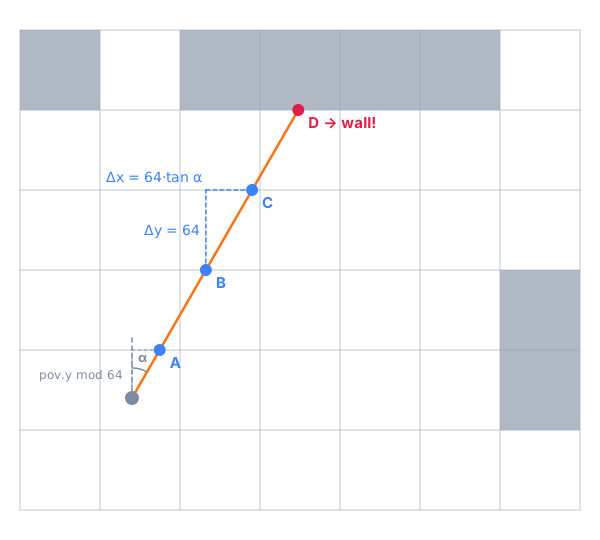
One subtle detail: an intersection point lies exactly on the grid line, so which block does it belong to? Dividing by 64 would give us the block below the line, but a ray going up wants to check the block above. The code solves that by subtracting 0.01 from A.y, which nudges the point into the right block.
Vertical grid lines
The vertical case is the same thing rotated by 90°: the first intersection is the next vertical grid line, then steps of 64 in x and 64 * tan(α') in y, where α' is the angle between ray and horizontal.
Choosing the closer hit
Now we have two candidates and we simply take the closer one using Pythagoras. There are two edge cases though:
- at
0°and180°a ray never crosses a horizontal line (andtanwould blow up), so the horizontal search is skipped. Same for vertical lines at90°and270°. - when a ray hits exactly a corner, both distances are (almost) the same. Letting floating point noise decide makes neighboring columns alternate between textures and you see a flickering seam. So if the distances are within
0.3 px, we stick with whatever the previous column chose.
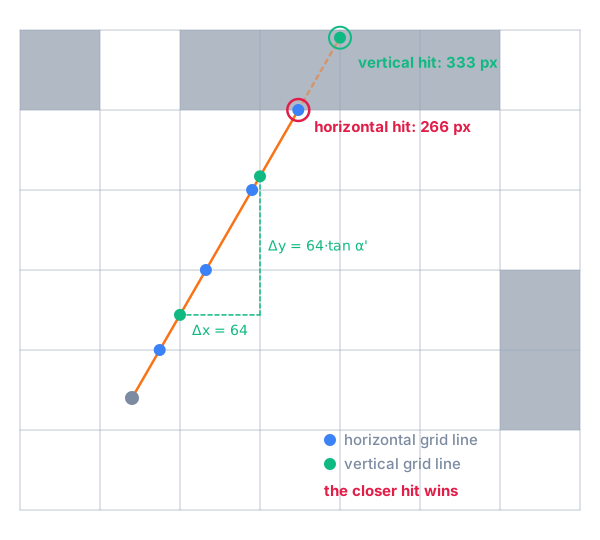
We also remember which kind of hit it was - we will need it for the texture.
3. Fixing the fish-eye
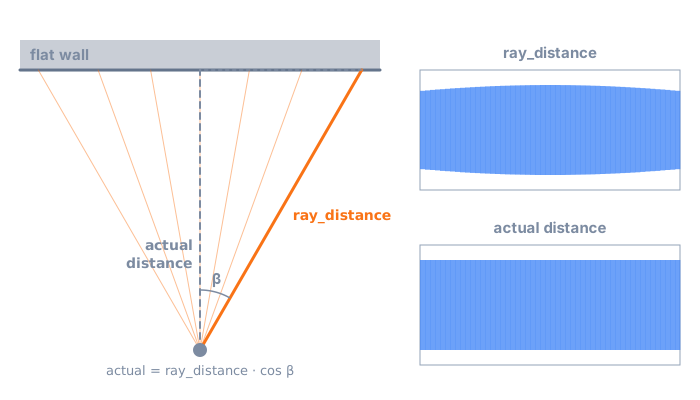
If you take the distance from the previous step and use it directly, a flat wall in front of you will bulge outwards. The reason: rays at the edge of the field of view travel further to reach the same flat wall than the center ray does.
What we actually want is the distance measured along the viewing direction, i.e. perpendicular to the projection plane. With β being the angle between the ray and the viewing direction, that's simple trigonometry:
beta = sum_angle(ray->angle, - view_angle);
actual_distance = cos(deg_to_rad(beta)) * ray->ray_distance;
4. Wall height
Now that we know how far away the wall is, how tall should it appear? Looking at it from the side, the eye, the projection plane and the wall form two similar triangles: a wall of 64 px at distance actual_distance maps to height h on a plane at distance d:
h / d = 64 / actual_distance
h = 64 * d / actual_distance
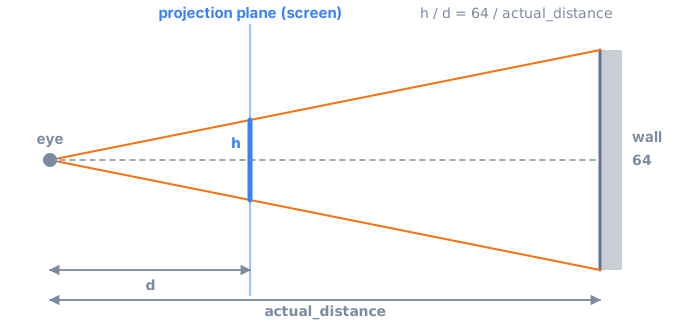
64 * d is constant, so it's computed once and each column only costs a single division. The wall is then centered vertically, starting at WINDOW_HEIGHT / 2 - h / 2.
5. Picking the texture
Each wall direction has its own texture. Which one to use falls out of two facts we already have: the type of hit and the ray direction.
- vertical grid line hit: ray points left → west texture, otherwise east
- horizontal grid line hit: ray points up → north texture, otherwise south
6. Slicing the texture
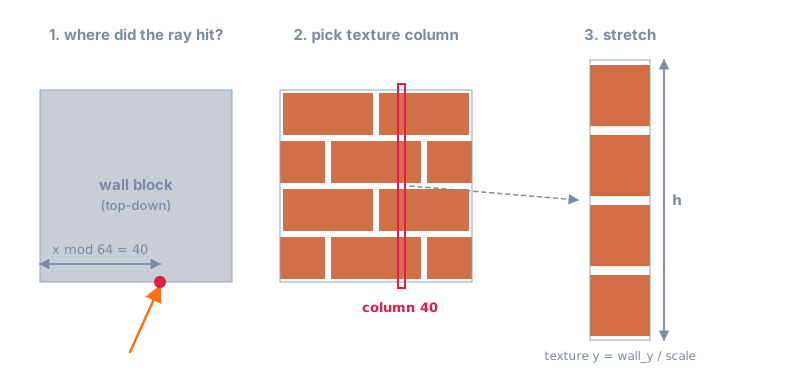
A texture is 64 x 64 pixels - exactly one block. So the column of the texture we need is just the offset of the hit point inside its block: x mod 64 for horizontal hits and y mod 64 for vertical hits.
That column is then stretched to the wall height h. For every pixel on screen we look up the matching texture pixel with texture_y = wall_y / scale where scale = h / 64. When you stand right in front of a wall, h is bigger than the screen. In that case we skip the first (h - WINDOW_HEIGHT) / 2 pixels so the visible part stays centered.
7. Ceiling, floor and shading
Everything above the wall gets the ceiling color and everything below the floor color. Done.
To add some depth, pixels further away are darkened. Multiplying each channel with a float between 0 and 1 per pixel works but we can do better: a lookup table maps the distance to an integer multiplier between 28 and 256, and dividing by 256 is just a bit shift:
pxl->r = (pxl->r * shader_mltplr) >> 8;
pxl->g = (pxl->g * shader_mltplr) >> 8;
pxl->b = (pxl->b * shader_mltplr) >> 8;
pxl->a = (pxl->a * shader_mltplr) >> 8;
Note that the alpha channel gets the same treatment, so far away walls don't just get darker but also more transparent.
8. Showing the frame
All of this is drawn into a second image buffer while the current one is still shown. Once all columns are done, the two pointers are swapped. This is called double buffering and prevents seeing half-finished frames.
Performance
Besides the shader table, a few other small things keep this fast:
BLOCK_SIZEis a power of two, so converting between pixel and block coordinates is a bit shift instead of a division or multiplication- constants such as
dand64 * dare computed once - a frame is only redrawn when the player actually moves or rotates
What I would do differently
When writing this, I realized some quirks worth naming:
- The constant angle step is wrong. I'm spacing rays evenly in angle - as a consequence they are not evenly evenly spaced on the plane (the distance between the intersections of the rays with the plane is bigger on the outside of the
FOVthen at the center). The exact angle for columniwould bedir + atan((W/2 - i) / d). - Angles instead of vectors. Representing the direction as an angle leads to a lot of casework (which quadrant? which sign? which edge case?). The approach described in Lode's tutorial uses a direction vector and a plane vector instead, which removes most of the casework and avoids calling
tanandcosper ray altogether. - Mirrored textures. The texture column is always the raw map coordinate
mod 64, regardless of which side of the block we look at. Looking south or west, the screen runs against the map axis, so those textures are drawn mirrored. With symmetric textures nobody notices - with text on a wall you would.
Conclusion
Behind the 3D look there is surprisingly little maths: a bit of trigonometry to find the walls, one cosine to fix the fish-eye and similar triangles for the wall height. The heavy lifting is done by the DDA, which turns 'find the wall' into a few additions per ray.
Here is the repo: code on GitHub.